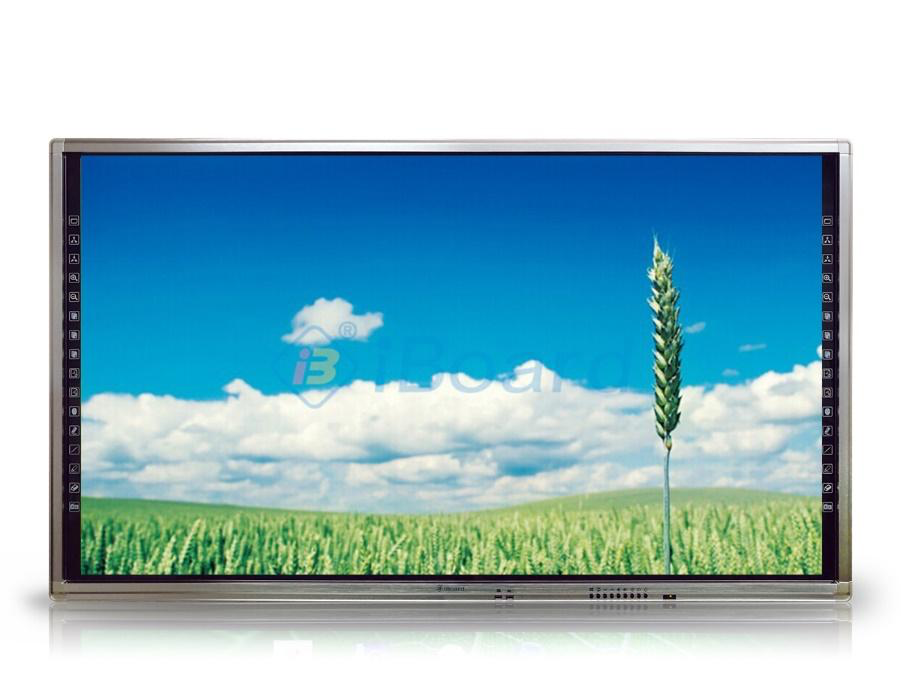
Màn hình tương tác thông minh iBoard TE-QS-86
Mô tả
Model: iBoard TE-QS-86
Color: Black
This monitor is one of newest design from iBoard, it is modernly designed, with two shortcut hotkeys on the two side of monitor for fast accessing to touch software. It supports UltraHD 4K Video playing. With embedded OPS. It is a good product for Classroom/ Meeting Room/Training center.
Specification
DISPLAY
Display Size: 86 inches
Display Ratio: 16:9
Display Area :1895.04mm(H) x 1065.96mm(V)
View Angle:178° (H)/ 178° (V)
Resolution 4K: 3840 x 2160 (QWUXGA)
Response Time: 8ms
Brightness: 350 cd/m2
Color Depth: 10bit(R), 1.07Billon colors
Contrast: 1200:1
Refreshing Frequency: 60 GHz
Screen Mode: 16:9/ 4:3/ dot to dot/ full screen
Life Time: 50,000 Hrs
TOUCH SYSTEM
Sensing Type: Infrared Touch
Cursor Speed: >100 points/s
Response Time: 4 ~ 8ms
Positioning resolution: 32767 x 32767
Accuracy: < 2mm
Communication Mode: Full-speed USB (Plug and Play)
Touch Input at the same time: 20 points
Touch Method: Finger, Pen, or any other opaque object
Surface Glass: 4mm Anti-Glare Toughened Glass
CONNECTION PORTS
Input Ports: HDMI 2.0*2, YPBPR*1, VGA*1, RJ45*1, SD Card*1, USB 2.0*1, USB3.0*1, Touch USB*1, RS232*1, AV in*1, MIC in*1, DP*1, OPS Slot*1, USB 3.0*3 (front), HDMI 2.0*1 (front), Touch USB*1 (front), Type-C (front, support touch, data, slow charging, video and audio transfer).
Output Ports: HDMI-Out*1, COAXIAL (SPDIF)*1, Line-Out (Earphone)*1, RJ45 Out*1, AV Out*1.
POWER
Voltage Range: AC (100~240) V-50/60HZ
Speaker: 15W x 2
Stand Power: <1W
Front hard buttons: Power, Source, Menu, Vol-/+, Home, Enter, ES.
Remote Conferencing: Supported
Operating System: Windows/ Linux/ Mac/ Android/Chrome OS
Hard Pen: Including 2 pens
Internet Browse: Integrated
Connection: Wireless multi-connection with smartphone (Android, iOS), tablet (Microsoft Office, Android, iOS), Laptop.
Open File Format: Microsoft Office, PowerPoint, XPS, PDF…
View images supporting formats: JPG/ GIF/ PNG/ BMP, zoom in/out, rotate images.
Watch videos in real time supporting formats: WMV/ MP4/ AVI/ MOV/ MPG.
Support opening Audio/ Video files in formats: wmv/ bmp/ png/ avi/ mp4/ asf/mp3.
Multi-connection: HDMI, Camera, USB, Wireless Mouse, Keyboard, WiDi, Miracast, Airplay
– There are 32 hard keys (Hot Key) designed on the left (16 keys) and right (16 keys) on the screen surface to quickly call up common features without having to open the software including:
+ 2 content library icon keys (Resource Library) on the screen allow access to various data sources including pages, images, text…
+ 2 free movement icon keys (Free Move) on the screen allow the user to move objects freely on the screen. + 2 back icon keys (Move Back) on the screen allow the user to move the selected object back to its original position on the screen.
+ 2 zoom icon keys (Zoom in) on the screen allow the user to zoom in on an area on the screen.
+ 2 zoom out icon keys (Zoom out) on the screen allow the user to zoom out a portion of the screen.
+ 2 white page icon keys (White Page) on the touch screen to create a blank page.
+ 2 black page icon keys (Black Page) on the touch screen to create a black page.
+ 2 green page icon keys (Green Page) on the touch screen to create a green page.
+ 2 page up icon keys (Page Up) on the screen to move to the previous page.
+ 2 page down icon keys (Page Down) on the screen to move down to the next page.
+ 2 black pen icon selection keys (Black Pen) allow writing in black.
+ 2 blue pen icon keys (Blue Pen) allow writing in blue.
+ 2 red pen icon keys (Red Pen) allow writing in red.
+ 2 green pen icon keys (Green Pen) allow writing in green.
+ 2 eraser icon keys (Eraser) on the screen for users to erase objects. There are many different types of erasers. + 2 keyboard icon keys (Keyboard) on the screen allow the user to call up the virtual on-screen keyboard.
– Wireless multi-screen sharing function.
– Share and save function using QR code scanning.
– Various application areas such as: Interactive education, business illustration. High definition, contrast, resolution.
– All activities that Teachers and students can perform with finger movements and movements directly with the surface of the comfortable, smooth screen.
– Anti-glare glass reduces light radiation from the screen, preventing eye fatigue and stress while viewing. Tempered glass is highly impact resistant.
* Futures of software:
– Software: Open software:
+ When opening the software, it will ask you to log in to your personal account or you can choose to skip it on the software interface.
+ When logging into the program, we can create courses and create class folders.
– The software has 3 main interfaces:
+ Editing software:
• On the editing software interface, we can open PPT and PPF presentations and edit them based on the software’s features. When stored, they will be saved on the cloud (cyberspace).
• Storage synchronization feature.
• Displays the text box.
• Shapes of straight lines, arrows, squares, circles, triangles…
• Insert images, videos, audio.
• Arrange and align objects. + Presentation:
• For presentations, we are provided with support tools such as pens.
• Writing tools: Ink pen, text pen, smart pen (formatting drawings), light pen (drawing bold strokes to create attention…).
• Eraser tool: Small eraser, medium eraser, erase all (drag the slider to erase).
• Support opening the program.
• Can open image formats (jpg, jpeg, .png, bmp, gif, svg, dib, tif).
• Open audio (mp3, wav).
• Open video (mp4, avi, wmv, mpg, mpeg, m1v, mov, asf).
• Open Office (doc, docx, xls, xlsx, ppt, pptx, pdf).
• Image library sources: Architecture, astronomy, biology, chemistry…
• Teaching support tools: Straight ruler, triangle ruler, protractor, projector, screen, software that provides the feature of sharing images from the screen to the phone by scanning QR code.
+ Screen caption:
• The software supports opening pre-installed learning programs and teachers can write directly on the software.
• Writing tools on software: Choose from 4 basic pen colors.
• Eraser: Select the object or hold down the button.
• Screen capture: Rectangular capture, free capture, full screen capture.
• Mouse pointer: Reselect the pointer after each action selection.
BUILT-IN PC MODULE
CPU: Intel® Core™ i5-1250PE 1.7GHz up to 4.4GHz processor
Chipset: Intel Single chip
Graphics: Integrated intel ® UHD Graphics
Sound Card: Cmedia HS100B HD Audio Stereo 5.1 channel
Networking: Intel 8111H Gigabit Ethernet 10/100/1000Mbps.
Memory: 8G
Hard Driver: 256G SSD
WIFI: 1*M.2 2230 for Wifi and Bluetooth
Connection Ports: HDMI*1, VGA*1, DP*1, RJ45*2, USB 3.0*6, USB Type C*1, Line out (Earphone) *1, Mic in*1
BUILT-IN ANDROID
Android 11.0
Ram: 4Gb
CPU: 4 x ARM Cortex-A55 @ 1.92GHz
Storage: 32Gb
GPU: Mali-G52
Bluetooth 5.0
ACCESSORIES
AC Power Cable/Writing Pen*2/Remote Control/HDMI Cable/Touch USB Cable (A-B port)/Software download card
AMBIENT CONDITIONS
Operation Temperature: 0°C~40°C
Dimension L*H*W: 1975.6*1178.7*85mm
Operation Humidity: 10% – 90%
Dimension(package) L*H*W: 2120*1353*240mm
Storage Temperature: -20°C~60°C
Net Weight: 66 Kgs
Storage Humidity: 10% – 90%
Gross Weight: 86 Kgs
VESA: 800*400 (mm)
Speaker: 15W*2
* The appearance and specifications of all items are subject to change without notice.